

Super Dodo Terminal (SDT) is your main control center. It connects to your Switch, opens and closes gates, freezes your map, tracks visitors, posts to Discord, and runs a built-in website — all from one window. It can handle one island or dozens at the same time.
New here? Work through Getting Started first (sys-botbase, Switch IP, profiles, anchors, first gate open, and optional file-organization tips).
The Main Window
When you launch SDT, you see the Multi-Island Control Center, a grid of island tiles, one per island you're hosting.
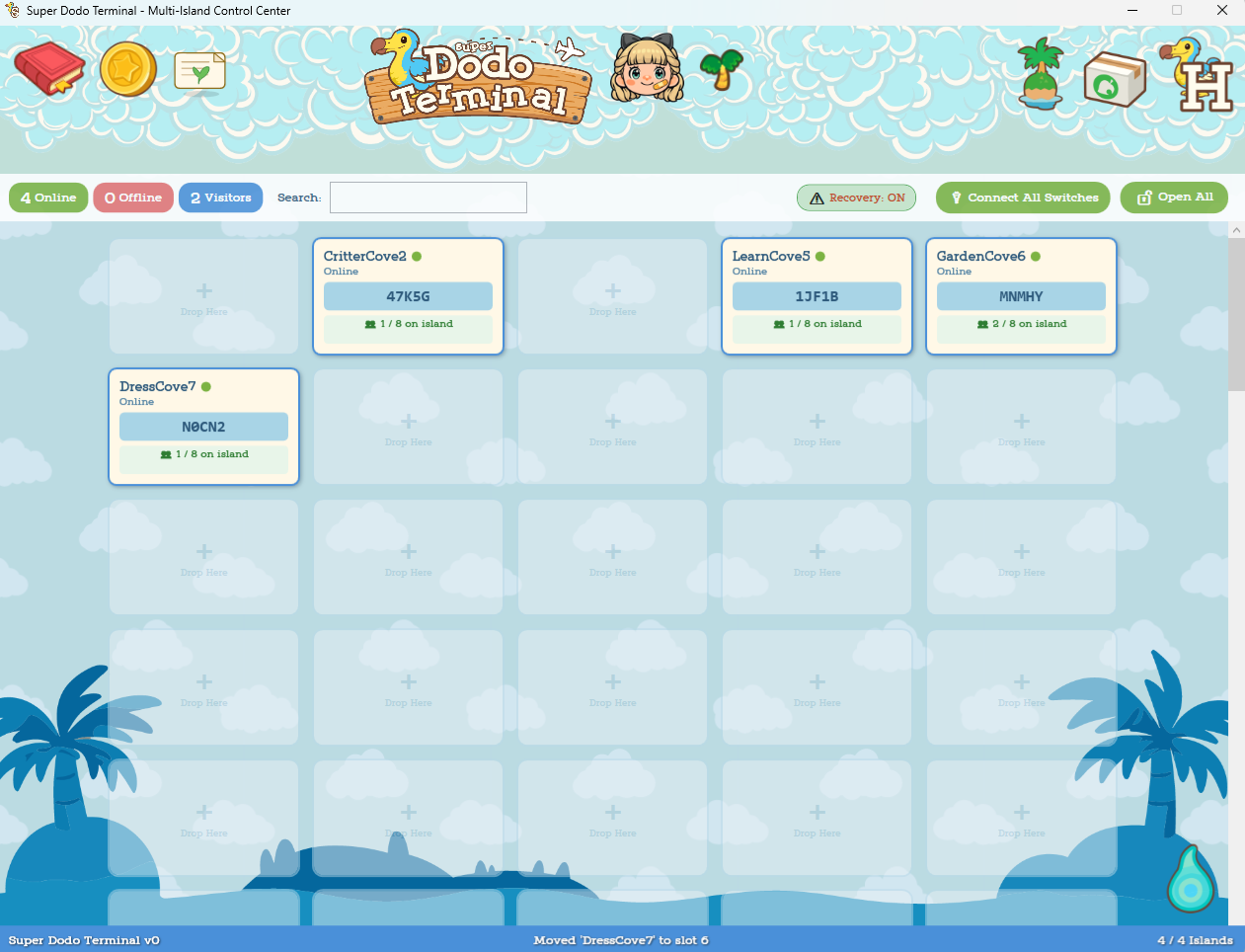
What's on Each Tile
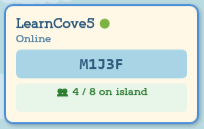
- Island name and status (connecting, online, offline)
- Dodo code (when the gate is open)
- Visitor count (e.g. 3/7)
- Platform tag — shows where this island is posted (Website, Discord, Facebook, or Disabled)
- Group badge — if this island belongs to a group
- Monetization badge — if turned on for that island
You can drag and drop tiles to rearrange them. Right-click a tile for quick actions like changing the platform tag, duplicating, opening/closing the gate, or clearing the tile. Cleared tiles are stored in the Profile Viewer & Editor.
Header Buttons
These sit across the top of the main window.










Toolbar

- Online / Offline / Visitors badges — Click to filter the grid
- Search — Find islands by name
- Recovery toggle — Pauses auto-recovery across all islands (safety switch if you're nervous during game/console updates)
- Connect All Switches — Connects every island that has an IP (and anchors) set
- Open All Gates — Opens gates on all connected islands at once
- Bulk Edit / Group Selected — Edit multiple islands at once
Anchors, gate automation, freeze, and map tools all start from the island detail panel (after you click a tile). See Island detail panel for the full guides.
Deeper guides (same app)
These pages pull out the biggest areas so this article is easier to skim:
- Island detail panel — Anchors, gates, freeze, map tools, host menu, per-tile settings, activity log, FAQs, Facebook host mode
- Profiles & Switch IPs — What a profile stores, Profile Viewer, labeling Switches
- Island Migrator — Moving saves between consoles safely
- Monetization — Monetization tools window (PayPal, subscriptions, supporters, Discord, order-island table)
- SDT General Settings — App-wide options (tunnel, team feed, HostHelper, UI, connection scale)
- Inbox, Add Island, Setup Helper, Beta Tester Export — Deeper sections on this page (expand below)
Inbox
(Add the full Inbox walkthrough here.)
Add Island
(Add the full Add Island / quick setup walkthrough here.)
Setup Helper
(Add the full Setup Helper walkthrough here.)
Beta Tester Export
(Add the full Beta Tester Export walkthrough here.)
Anchors, gates, freeze & map tools (quick pointer)
Almost all of this is per island, on the detail panel:
- Anchors — Four saved stand positions, Anchor Setup window, Fixer, reusing between maps
- Gate automation — Open / Close / Abort, don’t touch the controller, auto-recovery for this tile, timing table
- Map freezing — Treasure-island respawns,
.nhf3, visitor tips - Map tools — Dodo Editor, Map Helper, Map Cataloger
Full walkthroughs: Island detail panel.
Whole grid: The Recovery toggle on the main toolbar pauses auto-recovery for every island at once (handy during updates or when you want all automation to hold still).
Platform Tags
Each island tile can have a platform tag showing where it's posted:
- Website — Listed on your website
- Discord — Shared through Discord
- Facebook — Posted on Facebook
- Disabled — Not currently active
Right-click a tile to change its tag. This is for your organization — it helps you see at a glance which islands are posted where.
Groups
You can group islands together for organization and bulk actions.
- Group Selected — Select multiple island tiles and group them
- Bulk Edit — Change settings on multiple islands at once
- Groups show a colored badge on the island tiles
Useful when you have lots of islands and want to manage them in batches.
Setup Backups
Save your entire SDT configuration (all island setups, profiles, layout) as a backup. Restore it later if you reinstall or want to switch between different hosting schedules.
- Save — Creates a named backup with optional notes
- Import — Loads a previous backup
General Settings (whole app)
App-wide settings (not per-island). Open General Settings from the gear icon in the top bar (header). The full guide to the Cloudflare tunnel, team HostHelper feed, UI preferences, HostHelper auto-launch, boarding pass default, experimental connection scale, and more is on SDT General Settings.
Per-island behavior, OBS file paths, website lock/hide, map freeze, console speed, and gate timing live in Island Settings on the island detail panel — see Island detail panel → Island Settings (per profile / tile).
Multi-Switch Support
SDT can manage many islands on different Switches at the same time.
- Each island tile can connect to a different Switch IP
- Use the Switch IP Manager to label and organize your Switch IPs (see Profiles & Switch IPs)
- Connect All Switches connects everything in one click
- SDT prevents double-connecting to the same Switch
The main grid supports experimental tiers for large setups (dozens or even 100+ islands) with extra rows and layout adjustments.
What's Next
- SDT General Settings — Cloudflare tunnel, team feed, UI prefs, HostHelper auto-launch
- Island detail panel — Anchors, gates, freeze, map tools, menus, logs, FAQs
- Profiles & Switch IPs — Profile Viewer and Switch labels
- Monetization — PayPal, subscriptions, and the monetization tools window
- Getting Started — First-time path: requirements, sys-botbase, IPs, profiles, anchors, first gate
- Your Website — Show your islands online
- Discord & Modmin — Set up Discord notifications and team coordination
- HostHelper — Team dashboards and custom websites
